
Why App Store “fake GPS” apps can’t change your location
Every app you install from the App Store runs in its own sandbox. Apple’s platform security guide says sandboxing is designed to stop apps from modifying information stored by other apps or from making changes to the device. Your location is part of that: an app can read it (with your permission), but it can’t rewrite what Maps, Find My or a game receives.
So an app that calls itself a “fake GPS” or “location changer” can, at most, show a different place on its own map or create an image of one. Check the small print. Honest ones say they don’t change your device’s GPS.
What changes your iPhone’s location, and what doesn’t
| Method | What it changes | Do Maps, Find My and games see a new place? | The catch |
|---|---|---|---|
| VPN | The IP address websites and streaming services see | No. Your GPS position stays the same | Apps that use GPS still see where you are |
| Location Services off, or Hide My Location | Stops apps or people from getting your location | No. They get nothing, not a different place | Hides you; doesn’t place you somewhere else |
| “Fake GPS” apps from the App Store | Nothing outside the app itself | No | Apple sandboxes apps, so they can’t change what other apps receive |
| Location software on a computer | The position the iPhone reports while it’s connected | Yes, while it runs | Needs Developer Mode; many apps ban it and some detect it; emergency services may get the wrong location |
| Jailbreak tweaks | System location, after removing iOS protections | Yes | Apple warns it opens the phone to malware, crashes and failed updates |
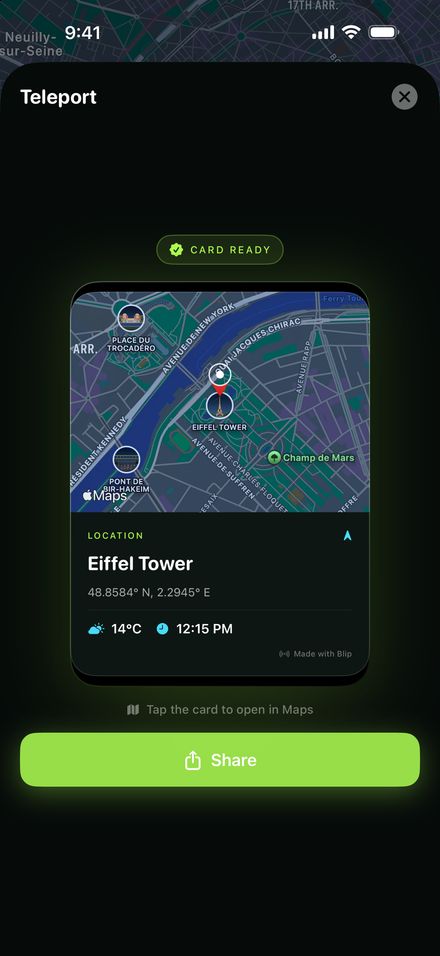
| Blip location card | Nothing. It makes a picture of a place you pick, with a Maps link | No | Shows someone a place; it doesn’t move you |
How computer-based location spoofing works
Apple’s developer tools can simulate a location so programmers can test location features in their apps. Desktop spoofing programs rely on the same kind of developer connection: with Developer Mode turned on, the computer feeds the iPhone a made-up position over a cable or Wi-Fi, and the phone reports it to every app while the connection lasts.
That’s why no App Store app can do it alone: the change comes from outside the phone. We don’t recommend specific tools. Many are paid, quality varies, and using them is against the rules of most location-based games.
Other things “change my location” can mean
Often people searching this want something else, and these do work:
- Your App Store country or region
- Go to Settings, tap your name, then Media & Purchases and Country/Region. Apple asks you to spend any account balance and end subscriptions that block the change first.
- The region websites and streaming services see
- A VPN changes your IP address, which is what most websites use to guess your country. It doesn’t change your GPS, so Maps, Find My and location-based apps still see where you are.
- Which apps can see your location
- Settings → Privacy & Security → Location Services lets you turn location off per app, or switch off Precise Location.
The risks
- Bans. Pokémon GO’s discipline policy treats GPS spoofing as cheating, with penalties from a warning up to permanent termination. Other location-based apps have similar rules.
- Detection. Apps that notice a spoofed location may refuse to work until you stop.
- Emergencies. While spoofing is on, your phone can give emergency services the wrong location.
- Security. Apple warns that jailbreaking removes security layers and can lead to malware, crashes, data loss and failed updates.
- Trust. Using a fake location to mislead people about where you are can damage relationships, and using it for fraud can be against the law.
What to use instead
- To keep your location private
- Turn off Location Services for an app, or stop sharing or hide your location in Messages and Find My. Nobody sees a fake place, they just don’t see you.
- To test an app’s location features
- Use Xcode’s simulated location, which Apple built for exactly that.
- To show someone a place
- Send a pin. Our guide to sending a pin on iPhone covers Maps, Messages and WhatsApp. Or send it as a card with Blip.
From the makers of this page
Blip shows a place, it doesn’t move you
Blip turns any place you pick into a card with the map, place name, local time and weather, and sends it with an Apple Maps link. It’s for sharing a place, not for fooling apps or people.
Blip doesn’t change your iPhone’s GPS or Location Services.
FAQ
Can you fake your GPS location on an iPhone?
Not with an App Store app on its own. Apple sandboxes third-party apps so they can’t make changes to the device, including the location other apps receive. The methods that do work run on a computer connected to the iPhone with Developer Mode on, or need a jailbreak.
Do “fake GPS”, “location changer” and “location spoofer” apps on the App Store work?
They can’t change the location your iPhone reports to other apps. At most they show a different place on their own map or make an image of one. Blip is that kind of app, and it says so up front.
How do I change my location on iPhone?
It depends what you need. To change your App Store country, go to Settings, tap your name, then Media & Purchases. To appear in another region for websites or streaming, a VPN changes your IP address. To change the GPS position apps see, no App Store app can do it.
Does a VPN change my location on iPhone?
It changes the IP address that websites and streaming services see. It doesn’t change the GPS position Maps, Find My, weather and most apps use.
Can I fake my location in Find My?
Find My shows your iPhone’s real location. You can stop sharing it or hide it for the rest of the day, but an App Store app can’t make Find My show somewhere else.
Will games ban me for spoofing?
Many will. Pokémon GO’s discipline policy, for example, counts GPS spoofing as cheating, with penalties that range from a warning to permanent termination.
Is spoofing safe?
It has real downsides: emergency services can receive the wrong location, apps that detect it may stop working, and jailbreaking removes iOS security protections.
What does Blip do, then?
Blip makes a location card for any place you choose (a map, the place name, local time and weather) and sends it with an Apple Maps link. It never changes your iPhone’s GPS.
Sources
- Apple Platform Security: Security of runtime process (app sandboxing)
- Apple Developer: Simulating location in tests
- Apple Support: Unauthorized modification of iOS
- Apple Support: Share your location with iPhone
- Apple Support: Change your Apple Account country or region
- Digital Trends: How to fake the GPS location on your iPhone or Android phone
- Pokémon GO Help Center: Three-Strike Discipline Policy